

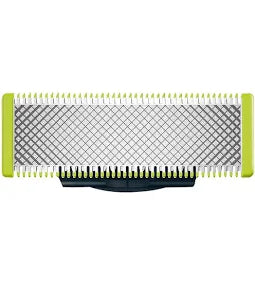
PHILIPS ORIGINAL BLADE ONE BLADE
This is a replacement blade for the Philips ‰ۡóÁÌÎ̝í�OneBlade‰ۡóÁÌ_•À_ hybrid trimmer & shaver system (which trims, edges...
- INR. 1,549
- INR. 1,549
- Unit price
- per
Please hurry! Only 2 left in stock
Subtotal:
INR. 1,549
10 customers are viewing this product
Couldn't load pickup availability

Description
x-
This is a replacement blade for the Philips ‰ۡóÁÌÎ̝í�OneBlade‰ۡóÁÌ_•À_ hybrid trimmer & shaver system (which trims, edges & shaves).í«ÌÎ_
-
Model/Variant: QP210/50 (also QP210/51, QP220/51) among others. For example, the QP220/51 pack includes 2 replaceable blades.í«ÌÎ_
-
Compatibility: Designed to fit all OneBlade handles.í«ÌÎ_
-
Longevity: Philips states each blade ‰ۡóÁÌÎ̝í�lasts up to 4 months*‰ۡóÁÌ_•À_ under typical use (based on 2 full shaves per week) before needing replacement.í«ÌÎ_
-
Features: The OneBlade system is designed with a cutter moving at high speed (200ÌÎÌ_ÌÎÌÓ per second), dual-protection (blade never directly touches skin), capable of dry/wet use.í«ÌÎ_
í«ÌÎ_Key Benefits
-
Optimised for trimming, edging & shaving: Because the OneBlade system is designed for all three tasks, the replacement blade allows you to maintain optimum performance for these tasks.
-
Reduced skin-irritation risk: The blade system is designed such that it ‰ۡóÁÌÎ̝í�cuts hair, not skin‰ۡóÁÌ_•À_ and uses glide coating and rounded tips for comfort.í«ÌÎ_
-
Easy maintenance & cost efficiency: Rather than replacing the whole trimmer/razor handle, you just swap the blade when it slows down/dulls ‰ۡóÁÌÎ̝ÌÎÌÕ more economical and simpler.
-
Universal fit for OneBlade handles: Makes upgrading/maintenance easier across the OneBlade ecosystem.
-
Wet & dry use compatibility: You can use the OneBlade system (and thus the blade) in the shower or with foam, offering convenience.í«ÌÎ_
í«ÌÎ_How to Use & Replace the Blade
Here‰ۡóÁÌ_åÈs how you‰ۡóÁÌ_åÈd typically install and use a new OneBlade replacement blade:
-
Turn off the handle: Ensure your OneBlade handle is switched off and unplugged/charging as necessary.
-
Remove the old blade:
-
If your model has a slide-switch blade release: push the release switch while holding the blade on both sides, lift off.í«ÌÎ_
-
If no release switch: press both edges of the blade and lift it off the handle.
-
-
Attach the new blade:
-
Remove the replacement blade from packaging (be careful‰ۡóÁÌÎ̝ÌÎÌÕedges are sharp).
-
Align and press both edges of the blade into the handle until it clicks securely.í«ÌÎ_
-
Start using: With the new blade in place, you can trim, edge or shave as usual with your OneBlade device. For best results: use long smooth strokes, against hair growth direction if shaving.í«ÌÎ_
-
-
Clean & maintain: After use, rinse if wet/dry compatible, remove hair debris, dry out. Regular cleaning helps blade stay efficient.
-
Replace again when dull: As the manufacturer suggests: typically after about 4 months of typical use (or earlier if you notice decreasing performance).
Related Products
kunchals
kunchals
kunchals
kunchals
kunchals
kunchals
kunchals
kunchals
kunchals
kunchals
Recently Viewed Products

- Choosing a selection results in a full page refresh.


